


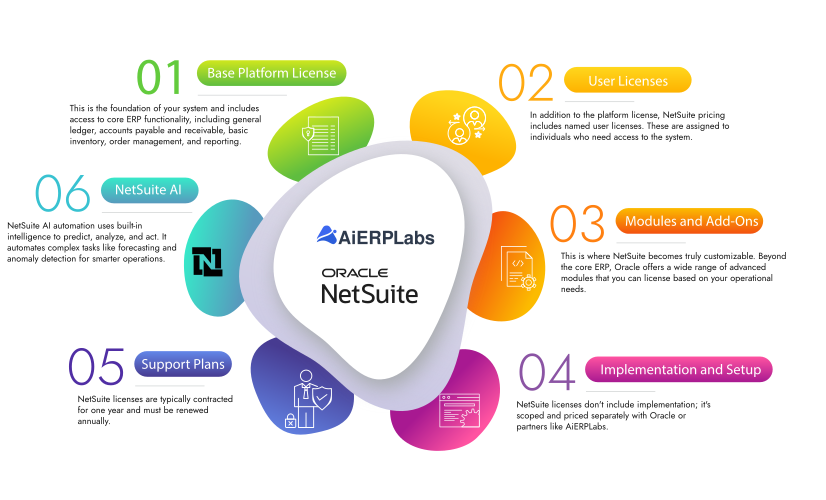
While a clear, fixed price isn’t published, NetSuite’s cost is not a secret—it’s intentionally flexible and tailored. As a cloud-based ERP designed to scale, your specific costs depend on key variables:
- Business Size & Users: The scale of your operations and number of required user licenses.
- Modules & Features: The specific applications and advanced capabilities you choose.
- Implementation Scope: How you configure, customize, and launch the system.
How does NetSuite pricing work?
Here are some of the factors that influence the pricing of NetSuite:
Base Package:
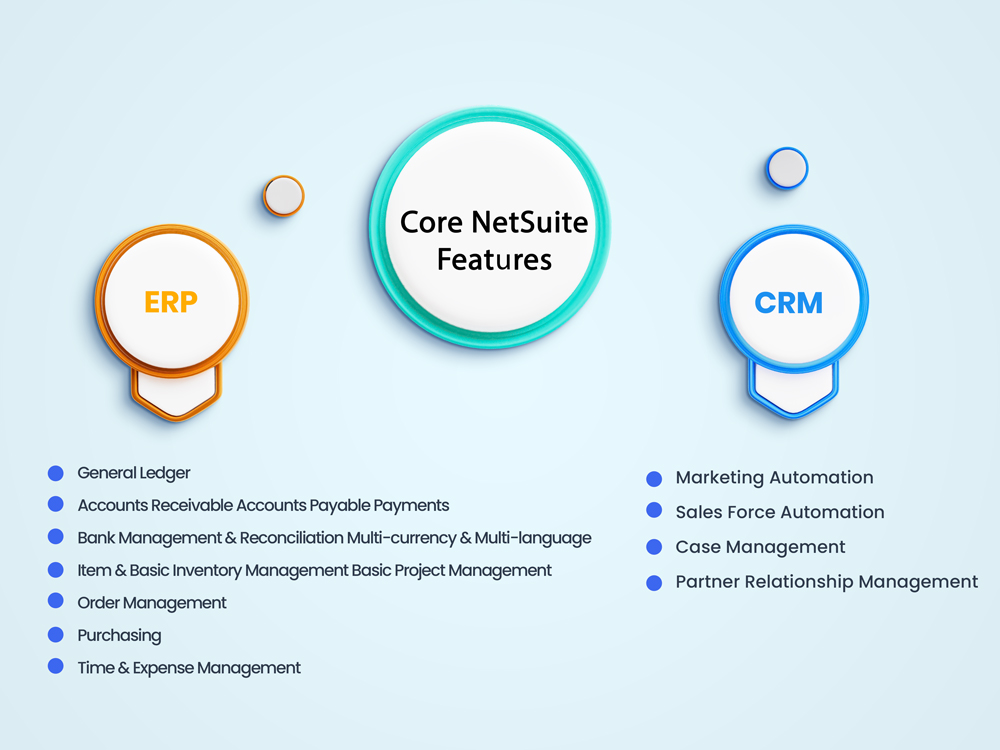
NetSuite offers various modules, including ERP, CRM, and e-commerce. The base price will be determined by which module or combination of modules you select.
Number of Users:
Pricing can scale based on the number of full users (those who require access to all features) and limited users (those who only need access to specific functionalities).
Add-on Modules:
Depending on the needs of the business, there are various add-on modules available, such as Advanced Inventory, Advanced Financials, and Manufacturing. Each of these comes at an additional cost.
Contract Duration:
The length of the contract can also influence the pricing. Longer commitments might result in lower monthly or yearly rates.
Implementation Costs:
Implementation, including setup, data migration, and training, is not part of the core software cost and is priced separately, often with an external partner.
Data Migration:
If you're transitioning from another system to NetSuite, you might incur expenses associated with data migration.
Customization and Integration:
Depending on your business's unique needs, you might require customizations or integrations with other software. This will typically increase costs.
Support and Training:
While basic support is included, there might be costs associated with additional training or premium support levels.
Updates:
Periodically, there might be costs associated with updates or new versions of the software, although many updates are included as part of the cloud subscription.
NetSuite Purchase & Implementation — Pre-signing Checklist
Use this checklist during procurement and legal review to reduce risk, control costs, and ensure a smooth implementation.
Top considerations
- Business objectives & scope: Confirm measurable goals, required modules, and a clear scope baseline to avoid scope creep and change-order costs.
- Total cost of ownership: Evaluate list price, partner discounts, implementation services, integration costs, training, and ongoing support to calculate multi‑year TCO.
- Contract term, pricing cadence, and renewal mechanics: Negotiate term length, upfront vs. monthly payment discounts, renewal price caps, and auto‑renewal clauses to preserve leverage.
- Legal review & risk allocation: Have in‑house counsel or outside ERP contract counsel review indemnities, limitation of liability, IP ownership for customizations, and termination rights.
- Implementation milestones & acceptance criteria: Define clear deliverables, test/acceptance gates, go‑live criteria, and remedies for missed milestones to avoid paying for incomplete work.
- Data migration & exit/transition rights: Require vendor obligations for data export, migration assistance, and transition support (format, timing, fees) to avoid vendor lock‑in later.
- Warranties, SLAs, and support scope: Specify warranty period, service levels for availability and support response times, and remedies for SLA breaches; separate warranty from ongoing maintenance terms.
- Customization, integrations, and ownership: Clarify who owns custom code, who maintains integrations, and how upgrades will be handled to prevent hidden upgrade costs.
- Data security, compliance, and privacy: Confirm security controls, encryption, breach notification timelines, and compliance with relevant regulations (e.g., GDPR, SOC reports).
- Resource commitments & change management: Ensure internal staffing, training plans, and a change‑management budget are agreed before signing to protect timelines and adoption.
- Payment & holdbacks tied to outcomes: Structure payments to align with milestones and acceptance; consider holdbacks or escrow for critical deliverables.
- Post‑go‑live support and optimization: Define warranty support, hypercare window, and options/pricing for ongoing optimization and future modules.
Practical tip: build a short decision matrix that maps risks to contract clauses (e.g., SLA credits, termination for cause, data export) and require those clauses as preconditions to signature.
Sources: negotiation & preparation guidance; legal pitfalls; ERP contract exit strategies; warranty negotiation; purchase contract features.
Does NetSuite have hidden costs?
| Cost Category | Indicative Cost Per Month | Notes |
|---|---|---|
| Base ERP Package | $999 | Basic Enterprise Resource Planning functionalities |
| Full User License | $100 - $200 | Cost per user requiring full access |
| Limited User License | $50 - $100 | Cost per user requiring limited access |
| Advanced Financials Module | $400 - $800 | Optional, for enhanced financial management |
| Advanced Inventory Module | $400 - $800 | Optional, for enhanced inventory management |
| CRM Module | $300 - $600 | Optional, for customer relationship management |
| E-commerce Module | $300 - $600 | Optional, for online business functionalities |
| Implementation Costs | One-time $5,000 - $10,000 | Can vary widely based on complexity |
| Customization | Variable | Depends on specific needs |
| Data Migration | Variable | Depends on the volume and complexity of data to be migrated |
| Training | Variable | Could be internal or through third parties |
| Premium Support | $200 - $400 | Optional, for enhanced customer support |
| Integration | Variable | Costs for integrating with other software |
Get in Touch
Take the first step to AiERP labs..
Visit Us:
1159 , Sonora Court
#304,Sunnyvale, CA 94086
Mail Us:
Phone Us:
415-370-5462

Send Us a Message